Safety Check: review the settings someone could change
An Android safety check you work through at your own pace. Safety Check is a guided list of the places where someone with brief access to your phone could see your location, messages or accounts. It opens the right screen for each item, and nothing on it leaves your phone.
Free on Google Play · Android 8.0 and up
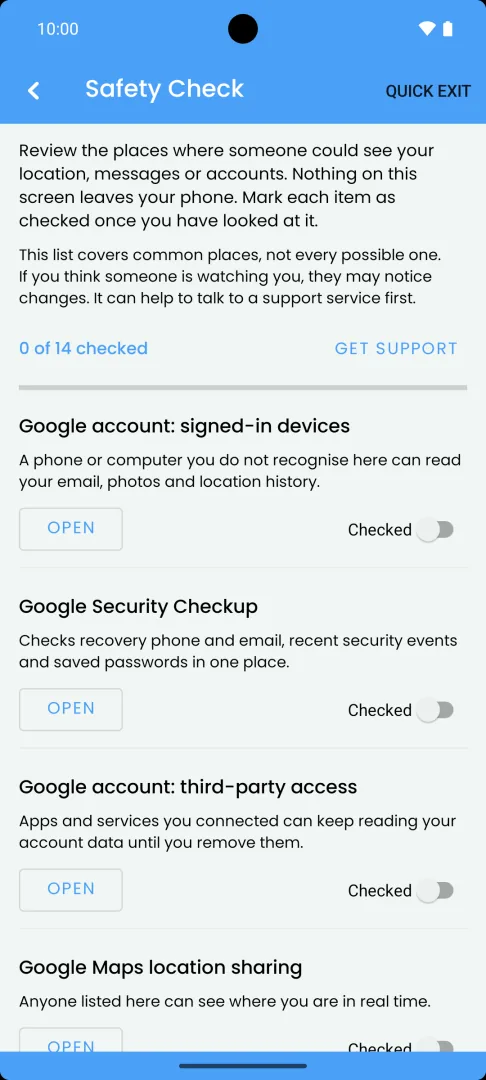
What Safety Check does
Safety Check is a checklist of places where someone could see your location, messages or accounts. You work through it and mark each item as checked once you have looked at it. The progress line shows how many you have done.
Your Google account and apps
- Google account: signed-in devices
- Google Security Checkup
- Google account: third-party access
- Google Maps location sharing
- Family Link and supervision
- Find Hub device sharing
- Google Photos partner sharing
- Gmail forwarding and filters
- WhatsApp linked devices
Settings on this phone
- Accessibility services
- Notification access
- Device admin apps
- Unknown tracker alerts
- Screen lock, and who knows your PIN
- USB debugging and developer options
Each item says in one sentence why it matters. For example, a forwarding address or filter in Gmail can quietly send copies of your email to someone else.
How it works
- Open the Suspicious App Checker from the Security section of Applore’s Home screen, then Safety Check under Safety toolkit.
- Read the short note at the top. The list covers common places, not every possible one.
- For each item, tap Open. Applore opens the matching settings screen, Google page or app.
- Look at what is there. Change anything you want to change yourself.
- Come back to Applore and tap Checked.
For some items, Applore reads what Android lets apps see and shows it next to the item:
- whether a screen lock is set;
- whether developer options and USB debugging are on;
- which apps have accessibility access, notification access or device admin rights, so you can make sure you recognise each one.
If a screen cannot be opened automatically, Applore tells you where to find it, for example which words to search for in the Settings app. Menus vary by phone maker and Android version.
What stays on your phone
Safety Check runs on your phone, and nothing on this screen is sent to Applore or anyone else. Which items you mark as checked stays on the device. The screen is hidden from screenshots and from the Recents preview, and Quick exit leaves Applore in one tap. The privacy policy has the details.
Free and Pro
Safety Check is free in both Applore Free and Applore Pro, with no ads on the safety screens. If you want to compare your phone before and after someone else had it, the snapshot check is part of Applore Pro.
Good to know
- Safety Check does not audit your Google account. It points you to Google’s own pages, and you review them there.
- It does not fix anything for you. Every change is your decision.
- It does not look for apps. To check installed apps against a list of known stalkerware, use Suspicious App Checker.
- For a written version you can follow without the app, read the Android phone safety checklist. More guides are in phone safety guides.
Questions
Does Safety Check scan my Google account?
No. Applore does not sign in to or read your Google account. For account items, such as signed-in devices, third-party access or Gmail forwarding, Safety Check explains why the item matters and opens Google's own page or app. You look at the settings there and mark the item as checked in Applore.
What settings does Safety Check cover?
It covers Google signed-in devices, Google Security Checkup, third-party account access, Google Maps location sharing, Family Link, Find Hub device sharing, Google Photos partner sharing, Gmail forwarding and filters, WhatsApp linked devices, accessibility services, notification access, device admin apps, unknown tracker alerts, screen lock, and USB debugging with developer options. It covers common places, not every possible one.
Does Safety Check change anything on my phone?
No. Safety Check reads a few things Android lets apps see, such as whether a screen lock is set, and opens settings screens for you. Every change is yours to make. If you think someone is watching your phone, remember they may notice changes, and it can help to talk to a support service first.
Is Safety Check free?
Yes. Safety Check is free in Applore Free and Applore Pro, and it shows no ads in either. The screen is also hidden from screenshots and the Recents preview. Applore Free shows ads on other screens outside the safety tools. Compare Free and Pro.
Related
Check your phone with Applore
Manage apps and files, lock private apps, and check for known stalkerware.