Leave this page

Opens a weather site. This page stays in your browser history unless you delete it.

Applore for Android Check your phone for apps that watch you in secret.

Applore checks your apps against a reviewed list of known stalkerware and flags hidden apps with sensitive access. It's free, runs on your phone, and shows no ads on these screens.

The same app locks private apps, keeps passwords in a vault, and sorts your files and screen time.

Free on Google Play · Android 8.0 and up · No ads on the safety screens

The app is in हिन्दी and 20 other languages.

100,000+installs on Google Play

4.3★ on Google Play (US store)

It can miss new apps, and a clean result doesn't prove the phone is clean. How the check decides

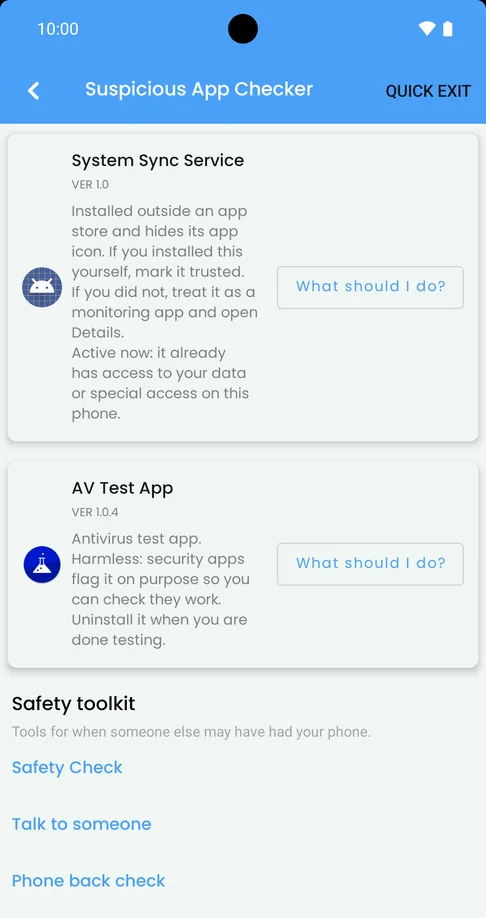
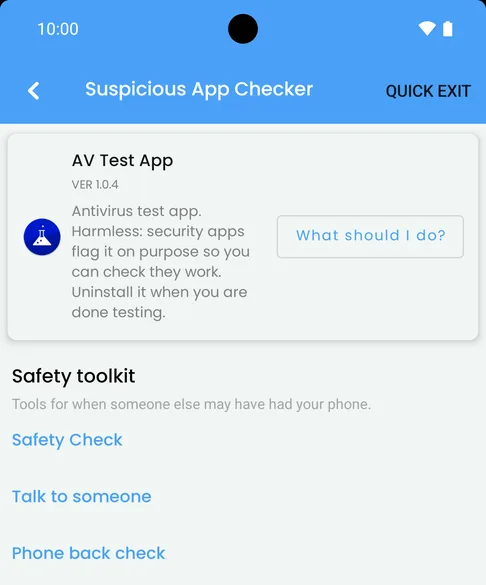
Applore's Suspicious App Checker on a test phone with one app flagged: 'AV Test App. Antivirus test app. Harmless: security apps flag it on purpose so you can check they work', a 'What should I do?' button, and the Safety toolkit below.
A flagged app, explained in plain words. This one is a harmless test app.
What's inside

Everything Applore does, on real screens

Screens from Applore Pro on a test phone, from the next update. Applore Free looks the same but shows ads outside the safety screens; Pro has none.

Safety check Free

Check for apps that watch you

The Suspicious App Checker compares your apps with a reviewed list of known stalkerware and flags hidden apps with sensitive access. Safety Check walks you through the settings someone could change. Free, with no ads on these screens.

Each flagged app comes with what it can do, where it came from and why it was flagged, and the steps to take before you remove anything.

It can miss new apps, and it tells you so.
Is an app watching my phone?
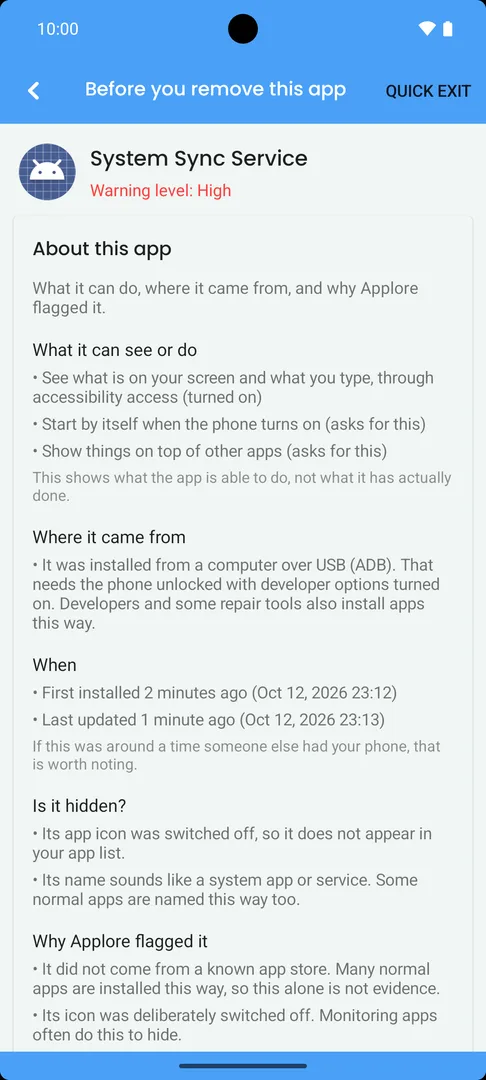
'About this app' for a test app named System Sync Service: what it can see or do (the screen and typing, through accessibility), where it came from, when it was installed, whether it is hidden, and why Applore flagged it.
Suspicious App Checker on a test phone flagging two test apps: 'System Sync Service', installed outside an app store with its icon hidden and access already turned on, and the harmless 'AV Test App'.
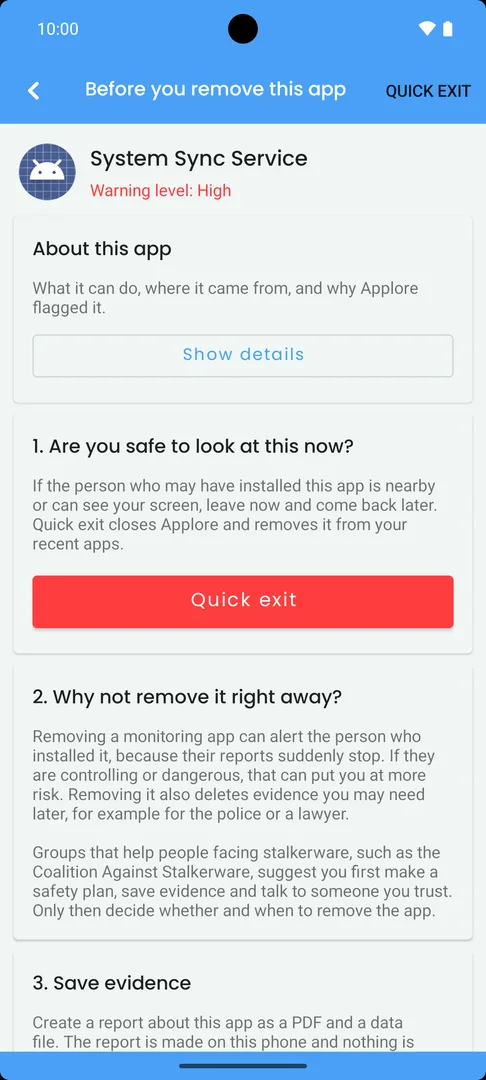
'Before you remove this app' for System Sync Service, Warning level High: '1. Are you safe to look at this now?' with a red Quick exit button, then why not to remove it right away.
  • Flags hidden apps with sensitive access
  • Runs on your phone
  • Quick exit in one tap

On screen: a test app we built to act like a hidden monitoring app, and a harmless antivirus test app.
App Lock Free

Lock any app with your PIN or fingerprint

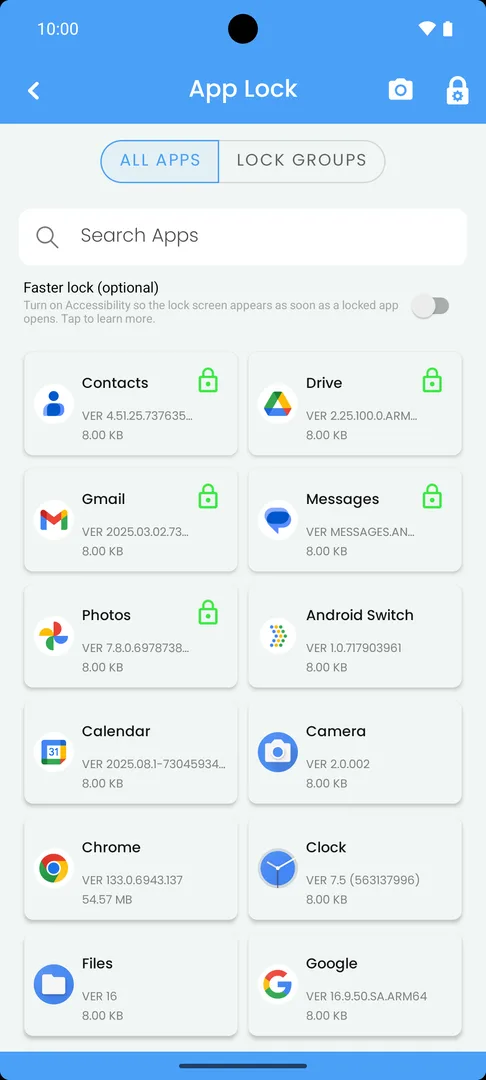
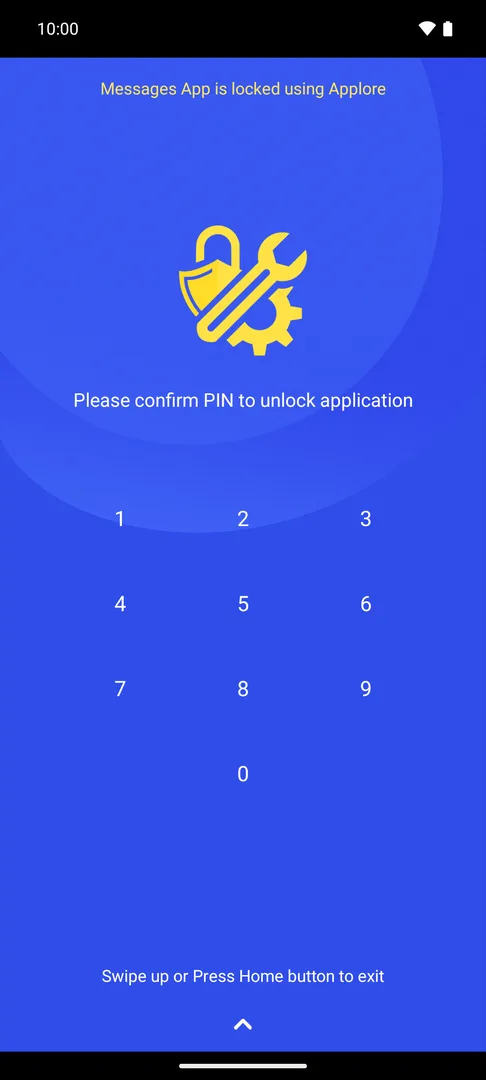
Pick the apps to lock: messages, photos, email, banking. Anyone who opens one has to get past your lock screen. Turn on the optional Faster lock and it appears the moment the app opens. Lock Groups let you switch to a different set of locked apps in one tap.

How App Lock works
App Lock on a test phone: a grid of apps with green lock icons on Contacts, Drive, Gmail, Messages and Photos.
The Applore lock screen over Messages: 'Messages App is locked using Applore' and a PIN pad.

Vaults Free and Pro

Keep passwords and private photos out of sight

Password Vault keeps your passwords behind the same PIN, with autofill (Free). Vault Gallery and Private Camera keep photos and videos in a vault that opens only inside Applore (Pro).

Backups go to your own Google Drive, and only if you turn them on.

Password Vault and Vault Gallery
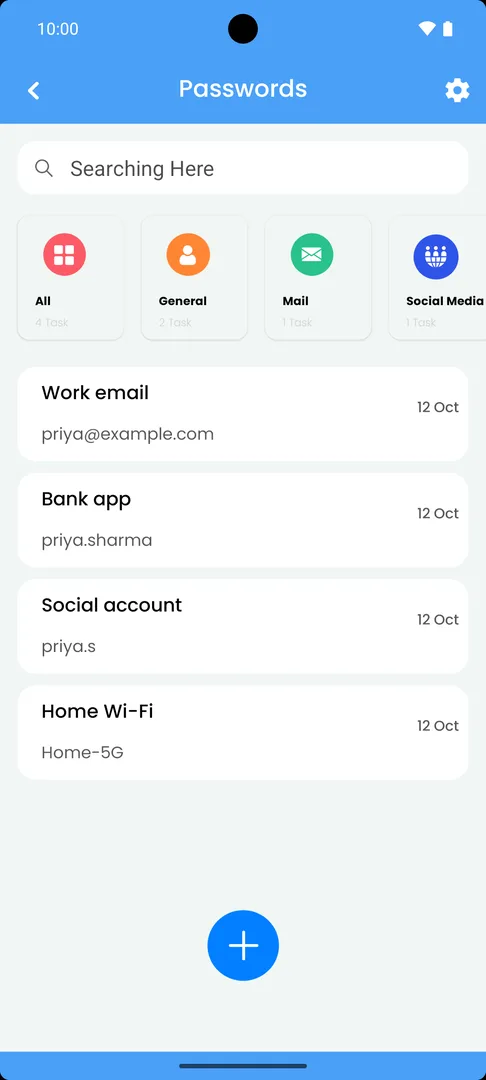
Password Vault on a test phone: entries for Work email, Bank app, Social account and Home Wi-Fi, grouped under General, Mail and Social Media.

Files Free (limited)

Every file, sorted for you

Images, videos, documents, downloads and installers in their own places, with a file explorer and storage at a glance. Find duplicate files (one group a day free) and merge duplicate contacts (5 a day free); Pro removes the limits.

Files and storage tools
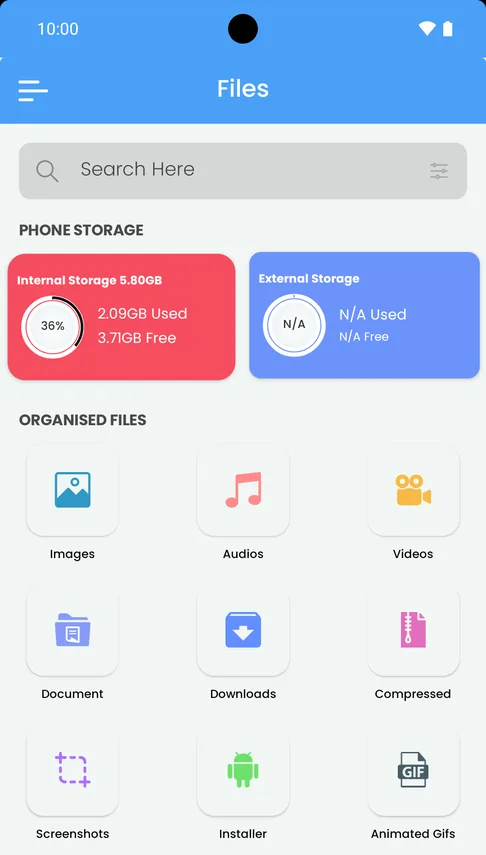
Applore's Files tab: phone storage used and free, then images, audio, videos, documents, downloads, compressed files, screenshots, installers and GIFs.

Mental Wellbeing Free and Pro

See where your time goes

Daily and weekly screen time and app launches. Focus Mode, Paused Apps and app usage limits for the apps you open too often. Pro adds Focus Mode schedules.

Mental Wellbeing
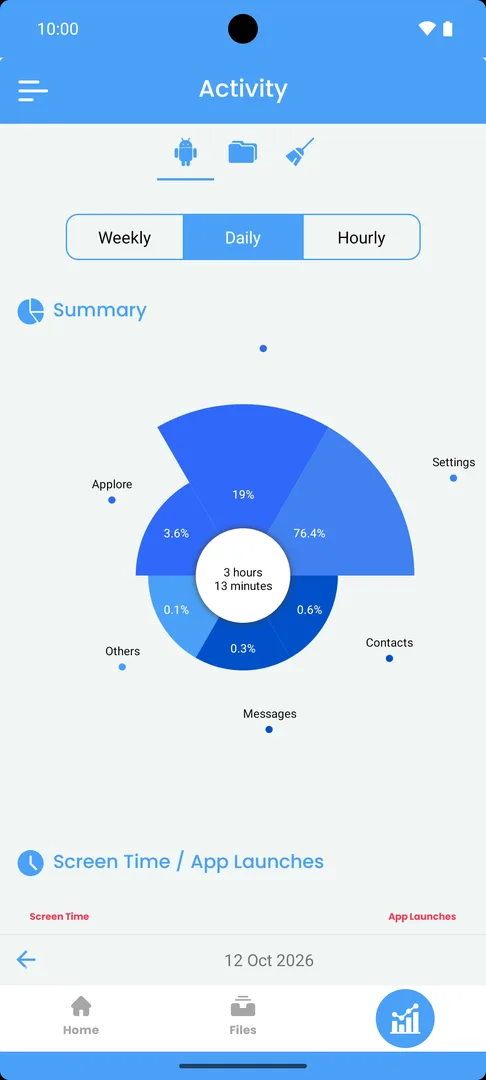
Applore's Activity screen: daily screen time of 3 hours 13 minutes in a chart, split by app.

Apps and device Free

Tidy up apps, and test your phone

Uninstall several apps in one go and back up app installers to your own Google Drive. Device Information shows your phone’s hardware, and the Hardware Test walks you through testing the speakers, sensors and buttons.

App Manager and Device Information
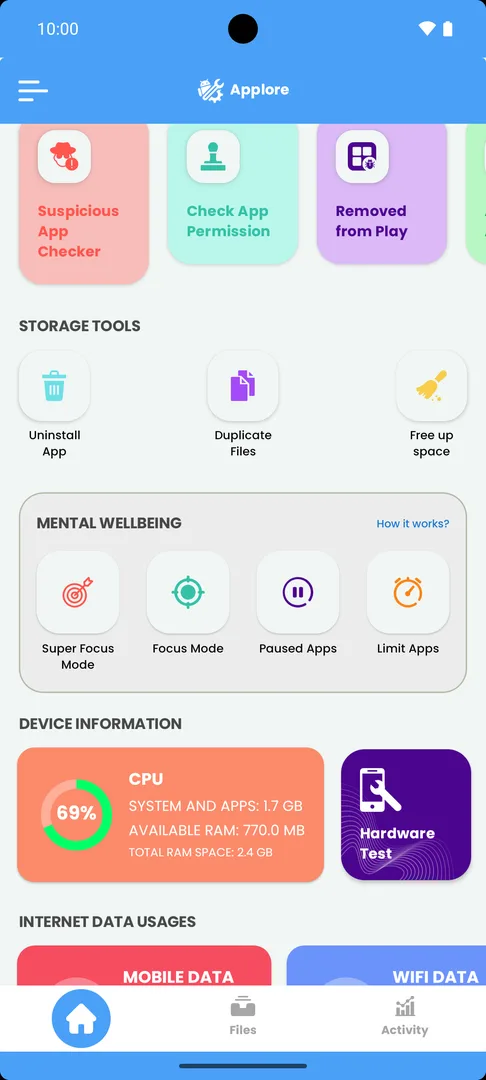
Applore's home screen with Mental Wellbeing (Super Focus Mode, Focus Mode, Paused Apps, Limit Apps) and Device Information: memory use and a Hardware Test button.

Get Applore free on Google Play

App Lock, Password Vault, the safety check, files, apps and screen time, in one app.

Free on Google Play · Android 8.0 and up

What people say

What people say on Google Play

A few reviews we chose; all 3,606 ratings are on Google Play.

Applore Free on Google Play

4.3out of 5 stars

100,000+ installs · 3,606 ratings

Rating from the Google Play store page (US store). Google Play shows a rating for each country, so yours may differ slightly. See the current listing on Google Play.

  • 5 out of 5 stars

    Absolutely Great App! Full of all sorts of helpful tools. I was happy to pay for PRO Version.

    Google Play review · Applore Pro · Jul 2025

  • 5 out of 5 stars

    The Best Security settings app ever.

    Google Play review · Applore Free · Aug 2023

  • 5 out of 5 stars

    mind blowing. i can check security, set mental wellbeing to stay away from phone at times… overall awesome app, very helpful.

    Google Play review · Applore Free · Jun 2021

Reviews are quoted word for word from Google Play, shortened only where marked with “…”. Reviewers are not named. Read all reviews on Google Play.

More Applore reviews

If someone else has had your phone

Start with your situation

Three short guides. Stop at any point.

  • The check runs on your phoneYour list of apps isn't sent to advertisers or analytics.

  • Free, with no ads on the safety screensIn both versions of Applore.

  • It helps you think before you deleteRemoving an app can alert whoever installed it. Applore lists helplines.

The check runs on your phone, and your list of apps is not sent to analytics or advertisers. What data Applore uses · How the check decides

Free and Pro

What's free, and what Pro adds

Applore Free has App Lock, Password Vault, the stalkerware check, Safety Check, safe-removal steps and helplines, plus the file, contact, app and wellbeing tools. It shows ads, never on the safety screens.

Applore Pro removes ads and adds Vault Gallery, Private Camera, Phone back check, Advance Lock, Focus Mode schedules, Large File Analyzer and unlimited duplicate-file and contact-merge use.

Compare Free and Pro

Keep your phone yours.

Get Applore free on Google Play: App Lock, Password Vault, a check for known stalkerware, files, apps and screen time, in one app.

Free on Google Play · Android 8.0 and up